
2D games
Use sprites, animation, physics, tile maps, lighting and game AI. Add keyboard, touch or controller input.
ABOUT HAYLEN
Haylen is an open-source engine for 2D games and apps. It brings graphics, physics, UI, audio and native plugins into one engine.

HOW IT WORKS
The engine is written in C++. Its API is also available in Lua through Varn, so you can write your app in Lua, work directly in C++, or add native plugins.
A Lua project contains an app.json file, a source/ folder for code and a
content/ folder for assets. The same project can run on each supported platform.
Haylen supports 2D today. The engine is organized so 3D can be added later.
Read the documentationWHAT YOU CAN BUILD
Use sprites, animation, physics, tile maps, lighting and game AI. Add keyboard, touch or controller input.
Build screens with UI components, text, forms and themes. Add audio, HTTP requests and WebSocket connections.
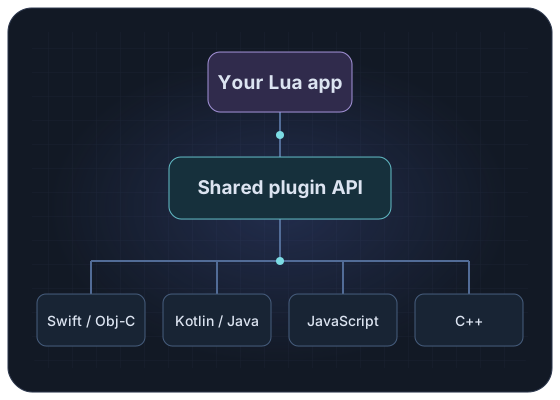
Use a native plugin when your project needs a platform API, an existing library or code written in another language.
THE PLUGIN SYSTEM
A plugin packages its code, assets and platform implementations together. Your Lua app calls its API without having to manage each platform separately.
PLATFORMS & GRAPHICS
Haylen tries the graphics APIs included in a platform build. Availability depends on the device and its drivers.
| Platform | Graphics APIs | Devices |
|---|---|---|
| macOS | Metal | Desktop |
| Windows | Direct3D 12 · Direct3D 11 · Vulkan · OpenGL | Desktop |
| Linux | Vulkan · OpenGL | Desktop |
| iOS & iPadOS | Metal | Phones & tablets |
| Android | Vulkan · OpenGL ES | Phones, tablets & TVs |
| Web | WebGPU · WebGL2 | Browsers with WebAssembly support |
| tvOS | Metal | Apple TV |
| visionOS | Metal | Apple Vision Pro |
| Mac Catalyst | Metal | Mac |
Each platform has its own build tools and minimum requirements. Read the platform guide
DEVELOPMENT
Use the Haylen command line to create and run a project. Hot reload updates your running app as you edit its Lua code and assets.
Build a web version when you want to test it in a browser.
Follow the setup guide# Create a project
haylen new ~/apps/my-app \
--name "My App" \
--identifier com.example.myapp
# Run the app
haylen run ~/apps/my-app
# Build and run for the web
haylen run ~/apps/my-app --platform webOPEN SOURCE
Use Haylen for personal or commercial projects. You can read, change and share the code under the MIT license.